COMMA SEPARATOR
What is Toolerz Comma Separator
Convert Column to Comma Separated Text Online using our Free Online Comma Separator Tool and download the Converted result in Excel or Text Format.
Note: Kindly separate each word with the enter button. For your reference kindly observe the below image to get an idea on input text format.

When a huge stored database is opened on the documents, excel sheets, or any other you will confront a disarray in the data placement.
Toolerz Comma Separator creates specific fields in which the data of a specific information gets adjusted accordingly.
In the process of differentiating the data spread and avoiding data jumbling, you can use a comma as the separator.
To insert appropriate punctuation (comma) several online companies generate commas in the defined areas by the deployment of the comma separator tool.
How Does Toolerz Comma Separator Tool Work?
Depending upon the requirement, you can select a comma, semi-colon, space, pipe, etc., to represent it as a separator.
The online comma separator tool services are made available for free the separator tool functions automatically and adds a comma separating each data value for instance.
Procedure to introduce punctuations in between data values:
You will have to copy the text from the file and then paste it into the first box of the comma separator tool.
Select the desired punctuation and then click the arrow that shall initiate the process of conversion.
In a little while you will find the converted data on the second box. From there, you can copy and paste at your desired location.
Before you make a copy of the converted format from the comma separator tool, you can review and save the formatted content. Further, you can update the text for its use in your documents or projects.
Applications:
The Comma Separator tool can be made useful in database concepts that are driven by programming languages.
These languages can be Informix, Sybase, SQL Server, Oracle, Postgres, MySQL, MS Access, and a lot more.
These languages allow comma-delimited values and the data can be transferred from a spreadsheet, or work document to a database.
The SQL queries contain data separated by punctuations such as commas, such as names, categories, mobile numbers, dates, Zip Codes, employee details, etc.
These comma separator tools are capable of generating an array of data from CSV, and Excel, and apply to programming languages like Python, Java, PHP, etc. In the process, an array of data from the Excel sheets are picked up and separated by commas.
For those working with measurements, check out our Area Calculator to quickly compute area for various shapes and dimensions.
Benefits of Toolerz Comma Separator Tool:
The Comma Separator Tool does run and separate/remove the commas from the administered values. The entire process goes on in an automated mode thus with minimal manual involvement you can save time and effort.
This tool formats the inputted data which creates a comma-separated list or removes the commas in a hassle-free manner (as shown in the below image).
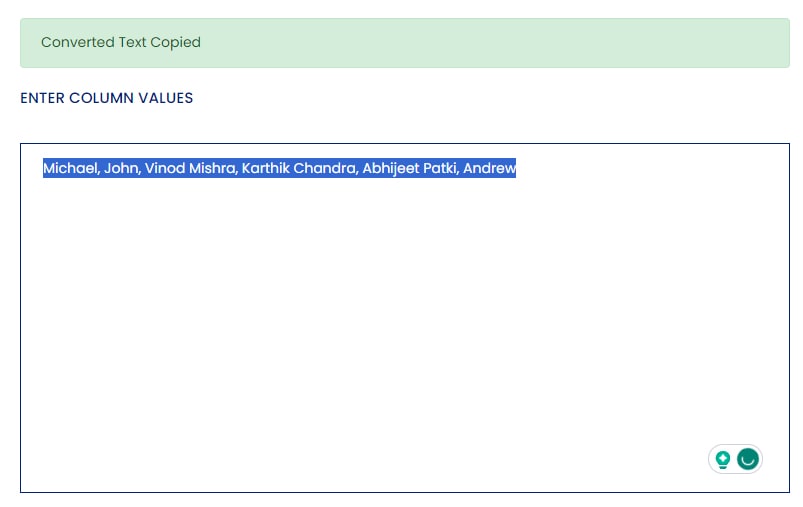
Column to Comma Separated Converted Result
You should never be in a myth about the statements that flow out such as, the tool can be handled by technical expertise only.’ Instead, you must realize that the features of the comma separator tool are labeled as a user-friendly interface.
The online comma separator tool introduces the comma in the content improves readability, and such an understandable format gains more accessibility for its reading purpose.
The usage of punctuation converts your documents, reports, and content into a well-structured and organized format by the comma separator tool.
Where Does the Comma Go in a 5-Digit Number?
In a five-digit number, the comma is placed after the first two digits from the left. This helps improve readability, especially with larger numbers. For example, the number 45862 should be written as 45,862.
The rule follows the International Number System, where commas are placed every three digits from the right. This means:
-
1,000 (four digits)
-
10,000 becomes 10,000 (no change)
-
100,000 becomes 100,000 (comma after the first three digits)
Correct comma placement is important for understanding and communicating numerical data clearly, especially in financial, academic, and official documents.
Always use commas consistently when writing large numbers to prevent confusion and make the number easier to read at a glance.
For digital use, many calculators and spreadsheets automatically insert commas in the correct places.
Key Features of Using Circular Hollow Section Weight Calculator
A Circular Hollow Section (CHS) Weight Calculator is a handy tool used to estimate the weight of circular hollow steel pipes based on their dimensions and material density.
One of its key features is accuracy it provides quick and reliable weight estimations, helping in planning material requirements and transportation. Another important feature is its user-friendly interface, allowing users to input diameter, thickness, and length easily.
The calculator is time-saving, eliminating the need for complex manual calculations. It also supports different unit systems, making it convenient for global users.
Additionally, it helps in cost estimation and project planning by giving an approximate weight, which is crucial in construction, fabrication, and engineering.
Using a CHS weight calculator improves efficiency and supports informed decision-making, making it a valuable tool for engineers, architects, and contractors. It's especially useful for ensuring compliance with load-bearing and safety standards.
What Are the Best Examples of Using a Comma Separator?
A comma separator is a key part of writing that helps make sentences clearer and easier to read. One of the best examples is in lists: I bought apples, bananas, oranges, and grapes. Here, commas separate each item for better readability.
Commas are also useful when combining two independent clauses: She wanted to go for a walk, but it started to rain. This helps avoid run-on sentences.
Another example is when adding introductory words or phrases: After dinner, we went for a drive. The comma sets the stage for the main part of the sentence.
In large numbers, commas act as thousand separators: 1,000; 10,000; 100,000 making figures easier to read.
Using comma separators correctly improves writing flow, clarity, and structure. Whether you’re writing an email or an essay, proper comma usage makes a big difference in communication.
While you're here, you can also check out our Mortgage Calculator to assist with your home loan calculations.
Advantages of Comma Separator
A Comma Separator is a simple yet powerful tool that improves the readability and clarity of large numbers or data sets. One of its main advantages is helping users quickly understand figures by separating digits with commas for example, turning 1000000 into 1,000,000.
This formatting is especially useful for financial reports, spreadsheets, invoices, and data entry, where accuracy and presentation matter. It reduces the risk of misreading large numbers and helps users avoid errors during calculations or analysis.
Comma separators are also helpful when converting lists, email addresses, or values into properly formatted CSV (Comma Separated Values) format, which is commonly used in data management and file exports.
Whether you're a student, accountant, business owner, or data analyst, using a comma separator boosts efficiency, precision, and professional presentation. It’s a valuable tool for organizing information in a way that’s easy to understand and share.
Conclusion of Using Comma-Separators
Using comma-separators in numbers is important for improving readability, especially with large figures. When numbers reach into the thousands or millions, adding commas helps break them into manageable groups.
For example, writing 1,000,000 instead of 1000000 makes it easier to understand at a glance. Comma-separators are commonly used in financial documents, data reports, and everyday communication involving numbers.
data-start="42" data-end="1044" data-is-last-node="" data-is-only-nodeThey reduce confusion, help avoid errors, and enhance clarity. In many English-speaking countries, commas are used after every three digits from the right. However, formatting can differ by region some use periods or spaces instead.
>Understanding and using comma-separators correctly not only improves presentation but also shows attention to detail.
Whether you're writing for business, academics, or personal use, this simple formatting tool makes a big difference in how your information is received. Always use commas properly for a clear and professional appearance.
Frequently Asked Questions
Q1. Why should I use a Comma Separator?
Ans: A Comma Separator helps you:
Format large numbers correctly.
Prepare CSV files for data processing.
Improve text readability in documents and lists.
Q2. Can I use a Comma Separator for numbers and text?
Ans: Yes! You can use it to format both numerical values and text lists. Just enter your data, and the tool will separate items with commas.
Q3. How do I remove commas if needed?
Ans: Many comma separators also offer a comma remover option. You can paste your text and choose to remove or adjust commas as needed.
Q4. Can I use this tool on my phone?
Ans:Yes, many comma separator tools are mobile-friendly. You can access and use them easily on your smartphone or tablet using any browser.
Q5. Is a comma separator tool free to use?
Ans: Yes, most comma separator tools online are free and require no sign-up. Just paste your number or list and click a button—it's that easy www.toolerz.com
Q6. How does a Comma Separator work?
Ans: A comma separator works by automatically adding commas into a number at regular intervals, typically every three digits. This process helps break down long numbers into smaller, more understandable chunks. For example, "123456789" will be formatted as "123,456,789."
Q7. Where can I find a Comma Separator Tool?
Ans: You can find Comma Separator Tools on various online platforms. Some calculators, spreadsheet programs, and websites have built-in tools that automatically format numbers with commas. Just search for "Comma Separator Tool" in your browser to find multiple options.
Q8. What is a Comma Separator?
Ans: A Comma Separator is an online tool that adds commas to numbers to make them easier to read. For example, it can change “1000000” to “1,000,000”.
Q9. Can I use this tool for multiple numbers at once?
Ans: Yes! Many comma separator tools allow you to input a list of numbers, and they’ll format all of them correctly in one go.
Q10. Does the Comma Separator support different number formats?
Ans: Yes. Some tools let you choose between Indian (e.g., 10,00,000) and International (e.g., 1,000,000) number systems depending on your need.
Q11. Can comma separators be used in programming?
Ans: Yes, in programming, comma separators help split data or list items so computers can read or process them correctly.