PASSWORD GENERATOR
Generated Password
Password Generator
Toolerz Password Generator is a Free Online Tool that can used to Generate Secure, Strong, and Random Password Online.
The Benefits of the Random Password Generator are Listed Below:
1. This Password Generator Software Tool helps you in providing strong and random passwords.
2. Password Generators encrypt your passwords by employing password managers.
3. Helps you generate client-side (Javascript) passwords that are 100% safe, secure, and protected.
4. Provides server-side passwords to online companies, servers, system managers, webmasters ( WordPress Blogs), etc.
5. Provides client-side (Javascript) passwords for users that are completely safe and secure.
6. Several online password generator software tools provide mobile apps to make it easily accessible.
7. Users can operate the password generator on web browsers (computers)/mobile apps.
8. Publishing a list of the best Password Generators in the online markets.
Purpose of Password Generator
The purpose of the online password generator is explained in brief below:
Strong Password Generator
Password Generator does create strong and secure passwords from characters, numbers, symbols, special characters, and letters.
These randomly picked passwords can prove to be more effective, since random passwords include alphanumeric passwords and are best applicable to all kinds of login.
Secure & Safe Password Generator:
Password Generators generate free password up to 16 character password and the same can be reduced to 8 characters password.
Secure Password provides an option to generate a custom password and the option in generating the passwords does exclude similar ambiguous characters.
Password generator does provide free services in generating a simple password, and is difficult to break. The software generator does provide a list of passwords to meet the essential needs.
No Internet Technical Support Is Required:
You can apply the password generation software with the non-accessibility of the Internet.
The password can be generated offline on mobile devices, phones, tablets or the computers.
The generated passwords are kept secretive and they are never stored in the company’s servers. Therefore, your passwords are 100% safe and secure.
How to Create a Strong Password?
The following are the essential tips to generate a safe and secure password for your account/ document.
The length of the characters used in generating a strong password makes it more secure and safe. Experts say, 16 characters are more protective than 8 characters. The composition of the strong password should clone this pattern as presented below:
For a safe and secure strong password it must contain:
1. At least 1 uppercase letter and more if you can accommodate.
2. At least 1 lowercase letter is essential in a secure password.
3. Use of Special Symbols, these characters are recommended for their strength and safety issues.
4. Use at least 1 number, it protects the password and its presence makes the hackers difficult to crack your password.
5. Making use of a strong password software creator can enable you to generate passwords on social platforms, such as Snapchat, Pinterest, Reddit, LinkedIn, TikTok, YouTube, WhatsApp, Twitter, X, Facebook, and Instagram.
Passwords: You Must Never Try
You must be aware that hackers attack portals, and financial apps to smuggle in and exploit the website/app that suits their purpose.
Do not follow the keyword sequence in the following form:
The password pattern such as names of families, pets, or even friends can be easily broken.
You should not use easy-to-remember passwords for security reasons.
You must not opt for names of sports, hobbies, and so on.
You must avoid creating passwords that reflect your birthday, postcodes, ID card numbers, social security numbers, or card numbers.
Never create an identical password, security questions, and different answers for multiple important accounts and websites.
Free Password Generator App:
You can avail the benefits of the password generator for free.
The password generator is compatible with producing at least 10,000 strong passwords at an instance.
The password generator works on mobile phone devices, and computers with the availability of Internet services.
In addition, the password generator works on iPhones, and iPads, Android phones, and tablets.
Password generator app is made available for the end users and the app can be downloaded from Play Store/Apple Store and installed on Android phones or iPhones.
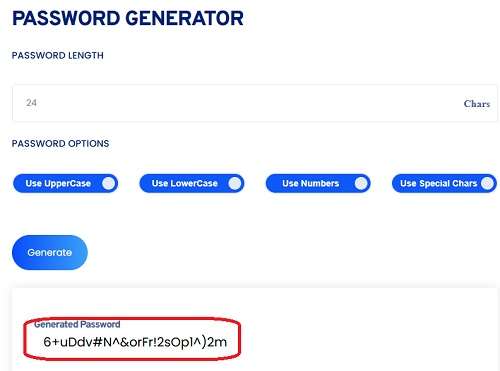
Key Features of Password Generator
A password generator is a useful tool designed to create strong, secure, and random passwords instantly.
One of its key features is customization you can choose the password length and include uppercase letters, lowercase letters, numbers, and special characters based on your security needs.
It helps protect your online accounts by generating passwords that are hard to guess or crack. Many password generators also offer options to avoid similar characters (like O and 0) for better clarity.
These tools are fast, free, and accessible online without the need for software installation.
Some also support bulk password creation and secure copy features. Whether you’re securing emails, banking, or social media accounts, using a password generator reduces the risk of hacking and improves overall digital security.
It's an essential tool for individuals and businesses looking to stay safe in the digital world.
Examples of a Strong Password:
You can generate a strong password by using a password generator, and they can be listed as follows:
z-b:C(egCi)!C=R6
HNr/7h!VO{ZZ6zEZ
IIWH483bc8@Vq”,P
Pq(8HCS17)39;p2q
Guidelines to Keep Your Password Safe & Secure:
Password Generator enables you to create a strong password but remembrance of it becomes much easier than ever. It will be almost impossible for the hackers to break it.
A Password generator shall support you with many passwords that would be impossible for the hackers to crack it. So, maintain a unique password for every account.
Never make a physical copy of your generated password or even store it online in any accounts.
Avoid pasting your username/password in Excel sheets, text files, or in Word.
Never entertain sending passwords via email, or share with others on social media.
Obtaining free wifi access could make your operating device insecure the moment the hackers gain access.
Obtain a password manager that shall keep a store of your generated passwords for all active accounts.
You will have to remember only one password from the password manager and you can find it online and is easily downloadable.
Password generator provides a two-factor login, it will keep your accounts protected, safe, and secure.
Make use of express VPN, or Nord VPN to hide your IP address to uphold safety and online privacy.
Besides individual users, companies, and system administrators make use of password generators to protect their websites from hackers and one specific discipline is WordPress Blogs.
Password generator provides a facility to encrypt the generated password by using the MD5 password generator manually.
For financial planning, try our SIP Calculator to estimate your mutual fund returns effortlessly.
How Can I Create a Password, Safe & Secure?
The random password generator is a browser-based tool and is compatible with all the major browsers such as Chrome, Firefox, Internet Explorer, Microsoft Edge, and Safari.
Password generator supports the client's needs by utilizing the client-side scripting language (JavaScript).
The Javascript will help you to generate a password offline on a usable web browser.
How Safe and Secure is the Generated Password on the Web Browser?
The password generator uses client-side javascript to generate passwords by using the computer's web browser or the mobile app screen.
The generated password does not get passed over to the server and therefore there is no scope for the password generator software to know your stored password.
Server-side Password Generator/Client-side Password Generator:
Passwords that are generated from the server side can be known to the password generator software experts. It opens up the possibility of a security breach but the passwords generated on the client side are more safe, and secure.
The received password from the server side can be subjected to a security breach because you will obtain the unencrypted format that is insecure over the Internet.
List of the Top Online Password Generator Tools:
You can obtain a list of online password generators that are considered to provide the best online password services to users. To list, some of them are:
1. Toolerz Password Generator
2. SecureBlitz Password Generator
3. NordPass
4. Panda Security Password Generator
5. F-Secure Password Generator
6. Norton Password Generator
7. Avast Password Generator
8. Lastpass Password Generator
9. AI Password Generator
How Safe Are Password Generators?
Password generators are generally considered safe, provided they are from reputable sources. They create strong, complex passwords that are difficult to guess or crack, combining uppercase and lowercase letters, numbers, and special characters.
This complexity significantly reduces the risk of password breaches. However, the safety of a password generator depends on its source.
Online generators may pose risks if they store or transmit generated passwords, potentially exposing sensitive information.
To enhance security, opt for offline password generators or reliable password management tools that use encryption to protect data.
Additionally, avoid using the same password across multiple accounts to minimize potential risks.
Applications of Password Generator
A password generator is a powerful tool designed to create strong, secure, and unique passwords, which are essential for safeguarding personal and professional information.
One of its primary applications is in enhancing online security by creating passwords that are hard to guess, thus protecting sensitive accounts from hacking attempts.
Password generators are widely used by individuals to secure personal accounts such as email, social media, and banking services.
In businesses, they help IT teams generate secure access credentials for employees, reducing the risk of data breaches.
These tools also assist in creating complex passwords for encrypted data or private networks, ensuring that passwords are not easily compromised.
Additionally, password generators are essential for managing multiple accounts, enabling users to avoid using repetitive or weak passwords across various platforms.
Overall, they are a vital tool for maintaining robust cybersecurity practices in today’s digital world.
Advantages of Password Generator
A Password Generator offers a simple yet powerful way to enhance online security. One of its main advantages is the ability to create strong, complex passwords instantly—eliminating the risk of using weak or easily guessable passwords.
These tools generate unique combinations of letters, numbers, and symbols, reducing the chances of cyberattacks like hacking or identity theft.
Another benefit is convenience—users don’t need to spend time thinking of secure passwords themselves.
Many generators also allow customization, so you can choose password length and character types based on your needs.
This is especially helpful for managing multiple accounts while keeping each one protected.
Overall, a Password Generator boosts your digital safety, saves time, and promotes better password habits, making it an essential tool in today’s digital world.
For those managing multiple financial accounts, you can also use our Mortgage Calculator to help you calculate mortgage payments, adding another layer of financial security to your planning.
Conclusion of Password Generator
In conclusion, a Password Generator is a reliable and essential tool for anyone looking to enhance their online security.
It eliminates the guesswork in creating strong passwords by generating complex combinations that are hard to crack.
Whether for personal accounts, business platforms, or sensitive data protection, using a password generator ensures each password is unique, secure, and meets best practices for cybersecurity.
It also helps save time and encourages the use of stronger, harder-to-hack credentials across multiple platforms.
By integrating a password generator into your digital routine, you significantly reduce the risk of unauthorized access and data breaches.
It’s a simple yet powerful way to stay one step ahead in an increasingly digital world.
Frequently Asked Questions
Q1: What is a Password Generator?
Ans: A Password Generator is an online tool that creates strong and secure passwords automatically. It helps you generate random combinations of letters, numbers, and symbols to protect your accounts from cyber threats.
Q2: Why should I use a Password Generator?
Ans: Using a Password Generator ensures your passwords are:
Strong and secure
Difficult to guess
Unique for each account
It reduces the risk of hacking or unauthorized access.
Q3: Are passwords generated by a Password Generator secure?
Ans: Yes, passwords generated using reliable Password Generators are highly secure. They are random and difficult to predict, making them much safer than passwords you create on your own.
Q4: Can I choose the length of the password?
Ans: Yes, most password generators let you choose the number of characters. You can also include uppercase letters, lowercase letters, numbers, and special symbols.
Q5: Do I need to download anything to use it?
Ans: No, you don’t need to download anything. Most password generators work directly in your web browser and are completely free to use.
Q6: Can I use the same password for all my accounts?
Ans: It’s not recommended. Using the same password for multiple accounts increases the risk of all your accounts being compromised if one password is hacked. A Password Generator helps you create unique passwords for each account.
Q7: Is it safe to use an online password generator?
Ans:If you're using a trusted website that doesn’t store your passwords, it’s generally safe. Always use a secure connection and avoid entering personal data on unknown or untrusted sites.https://www.toolerz.com/
Q8: How often should I change my generated password?
Ans:It is recommended to update your passwords every 3 to 6 months, especially for critical accounts. You can use the Password Generator to quickly create new, strong passwords each time.
Q9: Are Password Generators suitable for banking and financial accounts?
Ans:Absolutely. Password Generators are ideal for creating strong passwords for sensitive accounts, such as banking, email, and social media. They help you avoid using common or easily guessed passwords.
Q10: Can I generate multiple passwords at once?
Ans:Yes, many Password Generators allow you to generate multiple passwords simultaneously, making it convenient for creating unique passwords for different accounts.
Q11: How does a Password Generator work?
Ans:It randomly combines letters, numbers, and symbols to make a unique password based on your preferred length and settings.