SALARY CALCULATOR
- Annual
- Monthly
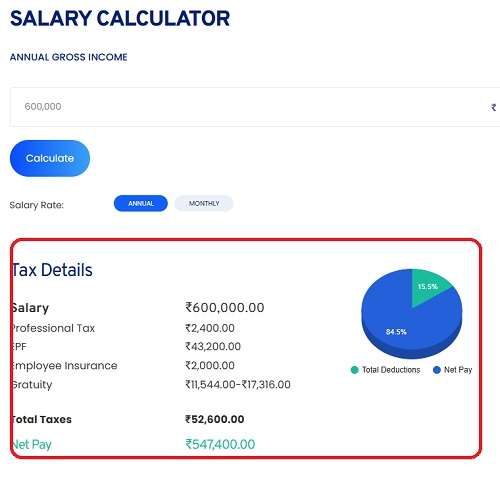
Tax Details
Salary
Professional Tax
EPF
Employee Insurance
Gratuity
Total Taxes
Net Pay
What is Toolerz Salary Calculator?
Toolerz salary calculator is an online tool that helps users calculate their salary after considering different factors such as gross pay, deductions (like taxes, provident fund contributions), and bonuses.
It computes the "in-hand" salary, commonly referred to as "net salary," and gives a clear understanding of how much an individual takes home after all necessary deductions.
How to Use Our Salary Calculator?
Follow the below steps to use our tool: toolerz.com.
- Visit Toolerz.com: Go to our Salary Calculator tool at toolerz.com.
- Enter Your Gross Salary: This could be your CTC or annual gross salary, whichever is more relevant to you.
- Enter Allowances & Bonuses: Include your housing allowances (HRA), travel allowance, and any performance bonuses you receive.
- Deductions: Input the amount deducted for taxes, provident fund, or any other compulsory deductions.
- Tax-Saving Investments: If you’ve invested in tax-saving schemes (like the Public Provident Fund or Life Insurance), input these amounts for tax calculations.
- Review the Breakdown: The tool will display your in-hand salary after deductions, total taxes, and the net salary you will receive monthly or yearly.
Benefits of Using the Salary Calculator
A salary calculator is a useful tool that helps you understand your take-home pay after deductions like taxes, PF, and insurance.
Whether you're an employee, job seeker, or freelancer, this tool makes it easier to plan your budget and manage your finances.
By entering your gross salary, the calculator instantly shows your net salary, monthly breakdown, and yearly earnings.
It also helps compare job offers by showing the actual money you’ll receive, not just the offered CTC.
This is especially helpful during salary negotiations or career changes. Some calculators even allow you to add bonuses or deductions for more accurate results.
Using a salary calculator saves time, reduces manual errors, and gives you a clear picture of your financial situation. It’s simple, fast, and accessible online making salary planning easier and smarter for everyone.
Functionality
Our Salary Calculator works by taking into account a range of variables to compute your salary. Here are some of the major factors it considers:
- Basic Salary: This is the core component of your CTC and is typically 40-50% of the total salary.
- Allowances: Includes HRA (House Rent Allowance), transport, special allowances, and more.
- Bonuses: Any performance-based or annual bonuses are factored into the calculations.
- Deductions: These include provident fund contributions, professional tax, and income tax.
- Taxes: Based on the Indian income tax system, our calculator automatically applies the correct tax slab to your earnings.
- In-Hand Salary: After considering all deductions, the calculator provides the take-home salary.
For a healthier lifestyle, check out our BMI Calculator to track your body mass index and maintain a balanced weight.
Applications of Salary Calculator
A salary calculator is a valuable tool that helps individuals and businesses determine accurate salary details.
For employees, it calculates take-home pay after deductions such as taxes, insurance, and retirement contributions, providing a clear picture of their earnings.
It also helps in comparing salaries across different regions or industries, assisting in career decisions.
For employers and HR professionals, salary calculators help with payroll management by determining the gross and net salary based on various parameters.
It simplifies the process of salary structuring, ensuring compliance with tax laws and company policies.
Additionally, salary calculators are useful for job seekers, allowing them to estimate expected salaries based on their skills, experience, and location.
It also helps in budgeting and financial planning by providing insight into potential income and deductions, ensuring individuals make informed decisions about their finances.
Take-Home Salary Calculator
The take-home salary, also known as the in-hand salary, is the actual amount that you receive after all deductions are made from your gross salary. This is a crucial number because it represents what employees can spend.
Our Take-Home Salary Calculator simplifies this process, offering a detailed breakdown of:
- Gross Salary
- Deductions (taxes, PF, etc.)
- Net or In-Hand Salary
Simply enter your gross salary and deductions to get an accurate idea of what you’ll be paid.
CTC in Salary:
CTC (Cost to Company) is the total amount an employer spends on an employee, and it often includes components that don’t appear in your take-home salary. Here’s a breakdown of CTC:
| CTC Components | Description |
|---|---|
| Basic Salary | Core component, often 40-50% of the CTC. |
| House Rent Allowance (HRA) | Allowance given for housing. |
| Conveyance Allowance | Provided for travel expenses. |
| Special Allowance | Extra perks or allowances specific to the role. |
| Bonus | Performance-based or annual bonuses. |
| Provident Fund | Retirement fund contributions, typically 12% of basic salary. |
| Professional Tax | A state-specific tax deducted from the salary. |
| Gratuity | Amount paid as a benefit after completing a certain tenure. |
| Total Deductions | Taxes, PF, etc., are deducted from the CTC to calculate the net pay. |
In-Hand Salary vs. CTC
Understanding the difference between CTC and In-Hand Salary is crucial when reviewing job offers. Here’s a comparison:
| CTC (Cost to Company) | In-Hand Salary |
|---|---|
| Total cost the employer spends on the employee. | Actual salary received after deductions. |
| Includes provident fund, taxes, bonuses, etc. | Excludes PF, taxes, and bonuses. |
| Generally higher than the in-hand salary. | Lower than the CTC, as deductions are applied. |
What is the Best Way to Calculate Salary?
The best way to calculate salary is by understanding both your gross and net pay. Start with your gross salary, which is the total income before deductions. Then subtract taxes, insurance premiums, retirement contributions, and any other deductions to find your take-home or net salary.
To calculate monthly salary from an annual package, divide the total by 12. For hourly workers, multiply the hourly rate by the number of hours worked in a week, then by the number of weeks in a month.
Using a salary calculator simplifies the process and ensures accurate results by factoring in tax rates and deductions based on your location and income bracket. This helps with budgeting and financial planning, giving a clear view of your actual earnings.
Key Features of Salary Calculator
A Salary Calculator comes with several key features that make it an essential tool for both employees and employers.
One of the most important features is automatic tax calculation, which accurately deducts applicable federal, state, and local taxes from the gross salary.
It also considers additional deductions such as retirement contributions, insurance premiums, and other benefits.
Another significant feature is the net salary estimation, which helps employees understand their actual take-home pay after all deductions. The calculator is usually customizable to include other allowances like bonus, overtime pay, and commission.
User-friendly interface is another crucial feature, making it easy for anyone to calculate their salary details without needing advanced financial knowledge. Additionally, many salary calculators also offer yearly summaries or reports to help with long-term financial planning.
Salary of ₹80 LPA: In-Hand Salary Breakdown
Let’s calculate the approximate in-hand salary for an individual with a CTC of ₹80 Lakhs Per Annum (LPA).
- Basic Salary: Approx. ₹32 Lakhs (40% of CTC)
- HRA: Approx. ₹16 Lakhs (20% of CTC)
- Bonus and Allowances: ₹12 Lakhs
- Provident Fund Contribution: ₹3.84 Lakhs
- Taxes: Based on the applicable tax slab, significant deductions will apply here.
Approximate in-hand salary would be around ₹60-65 Lakhs per annum after taxes and provident fund deductions, depending on specific allowances and bonuses.
Indian Income Tax Slabs for Salaried Employees (FY 2023-2024)
| Income Range (₹) | Tax Rate (Old Regime) | Tax Rate (New Regime) |
|---|---|---|
| Up to ₹2,50,000 | Nil | Nil |
| ₹2,50,001 - ₹5,00,000 | 5% | 5% |
| ₹5,00,001 - ₹7,50,000 | 20% | 10% |
| ₹7,50,001 - ₹10,00,000 | 20% | 15% |
| ₹10,00,001 - ₹12,50,000 | 30% | 20% |
| ₹12,50,001 - ₹15,00,000 | 30% | 25% |
| Above ₹15,00,000 | 30% | 30% |
Formula for Salary Calculation
To calculate the in-hand salary, you can use the following formula:
In-Hand Salary = Gross Salary - Deductions (Tax + Provident Fund + Professional Tax)
- Gross Salary: Basic Salary + Allowances + Bonus
- Deductions: Provident Fund (12% of Basic) + Income Tax + Professional Tax
Example:
For a gross salary of ₹10,00,000, with a 12% Provident Fund (PF) contribution and a 20% income tax rate:
- Gross Salary: ₹10,00,000
- Deductions:
- PF Contribution (12% of Basic Salary): ₹1,20,000
- Income Tax: ₹2,00,000
- Other Deductions (if applicable): ₹0
- In-Hand Salary:
- In-Hand Salary = Gross Salary - Deductions
- In-Hand Salary = ₹10,00,000 - (₹1,20,000 + ₹2,00,000)
- In-Hand Salary = ₹6,80,000 per annum
This gives you a clear understanding of the formula for calculating your take-home pay after deductions. It simplifies the complexities of various allowances, taxes, and PF contributions.
Advantages of Salary Calculator
A Salary Calculator offers several key advantages, making it an essential tool for both employees and employers.
Firstly, it ensures accuracy by quickly calculating net salary after deductions like taxes, insurance, and other benefits, helping users avoid errors in manual calculations.
Another advantage is time-saving. Instead of spending hours figuring out complicated pay structures, the calculator provides instant results, allowing employees to better plan their finances.
This can be especially helpful for budgeting and managing expenses.
For employers, the Salary Calculator can assist in compliance with tax regulations, ensuring that the correct tax amounts are deducted and reported. It also aids in transparency, providing employees with clear insights into their earnings.
If you're looking to calculate other financial details, try our Financial Calculator for a range of useful tools.
Frequently Asked Questions
Q1. How accurate is your Salary Calculator?
Ans: Our Salary Calculator is highly accurate, updated with the latest tax slabs and provident fund rules. It provides a precise breakdown of your salary based on current regulations.
Q2. Does the calculator work for both salaried and hourly employees?
Ans: Yes, our calculator is flexible enough to accommodate salaried employees, hourly wage earners, freelancers, and consultants.
Q3. Can I calculate my take-home salary in different currencies?
Ans: Currently, the calculator is designed for Indian salary structures in INR. However, currency conversion features may be added in future updates.
Q4. How does it account for tax-saving investments?
Ans: You can manually input your tax-saving investments (like Section 80C deductions) to adjust your tax liability, allowing the calculator to estimate your post-tax salary.
Q5. Is the calculator suitable for calculating bonuses and commissions?
Ans: Yes, you can add any performance-based bonuses or commissions in the allowances section of the calculator for an accurate breakdown.
Q6. How often is the Salary Calculator updated with new tax laws?
Ans: We regularly update our calculator to reflect changes in Indian tax regulations and salary components to ensure accurate results.
Q7. How do I calculate the in-hand salary from my CTC?
Ans: Simply input your CTC and applicable allowances/deductions into our Salary Calculator, and it will compute your in-hand salary after considering taxes and provident fund deductions.
Q8. Can I use the calculator to estimate my future salary if I get a raise?
Ans: Yes, Input the expected CTC and new salary structure to project your future in-hand salary after receiving a raise.
Q9. Does it factor in all types of allowances, like HRA or medical allowances?
Ans: Yes, our calculator supports various allowance types, including HRA, travel allowances, special allowances, medical allowances, and more.
Q10. How does the calculator handle provident fund contributions?
Ans: Our Salary Calculator automatically deducts 12% of your basic salary for provident fund contributions, which is the standard practice in India.
Q11. Is this calculator applicable for employees working abroad but getting paid in INR?
Ans: Yes, as long as your salary is structured in INR and adheres to the Indian tax system, you can use this calculator to compute your take-home pay.
Q12. What if I work in a state that has professional tax?
Ans: The calculator allows you to input your professional tax, which will be deducted along with other components to give an accurate net salary.
Q13. Can I calculate the salary for a specific month if there’s a bonus or deduction that month?
Ans: Yes, you can customize the inputs to reflect one-time bonuses or deductions in specific months, helping you calculate your exact salary for that period.
Q14. Does the Salary Calculator consider voluntary contributions to the provident fund?
Ans: Yes, you can manually input your voluntary provident fund contributions, and the calculator will adjust your net salary accordingly.
Q15. Can I save the salary calculation results for future reference?
Ans: At the moment, the calculator does not have a save feature. However, you can easily download or screenshot the results for personal records.
Q16. What information do I need to use a Salary Calculator?
Ans: To use a Salary Calculator, you typically need the following details:
Gross Salary (Annual or Monthly)
Tax Deductions
Provident Fund or EPF Contribution
Professional Tax
Other Allowances and Bonuses
Q17.Can I use the calculator for monthly and yearly salaries?
Ans: Yes! You can calculate both monthly and annual salaries. Most tools let you switch between these options easily.
Q18.Can I calculate both gross and net salary?
Ans: Absolutely. You can enter your gross salary (before deductions), and the calculator will show your net salary (after deductions).
Q19.Can a Salary Calculator show my annual salary?
Ans:Yes, many Salary Calculators can provide both monthly and annual estimates. You can input your monthly salary, and the calculator will multiply it by 12 to give you an estimate of your yearly income. Similarly, if you know your annual salary, you can break it down into monthly, weekly, or daily earnings.
Q20. What is a Salary Calculator?
Ans:A Salary Calculator is an online tool that helps you estimate your gross and net income based on various factors like your salary, deductions, bonuses, and taxes. It helps you understand how much you will take home after all deductions are made.
Q21. Can a Salary Calculator include bonuses and allowances?
Ans:Yes, many salary calculators let you add bonuses, allowances, and other income to get a complete picture of your earnings.