TEXT FLIPPER
Flipped Text
What is Toolerz Text Flipper?
Toolerz Text Flipper is an advanced online tool designed to transform text in various ways.
It provides functionalities such as flipping text upside down, mirroring it, and reversing it. This tool is particularly useful for creative projects, graphic design, and even social media posts where unique text presentation can grab attention and enhance visual appeal.
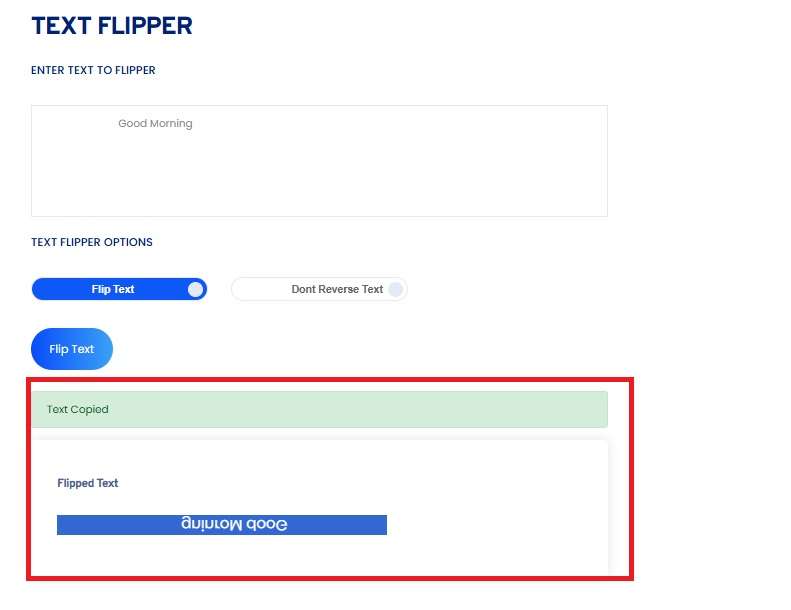
How to Use Text Flipper
Follow these steps to transform your text:
- Visit the Tool: Go to www.toolerz.com and locate the Text Flipper tool.
- Enter Your Text: In the provided text box, type or paste the text you want to flip or transform.
- Choose Your Transformation: Select the desired text transformation option—Flip Upside Down, Mirror, or Reverse.
- Generate Transformed Text: Click the "Flip Text" button. The tool will process your input and display the transformed text in the output box.
Benefits of Text Flipper
A Text Flipper is a versatile tool that reverses the order of characters in a given text, making it a fun and useful resource for various purposes.
One of its key benefits is easy text manipulation, allowing users to flip words, sentences, or even entire paragraphs quickly.
This can be especially helpful for generating mirror text for creative projects, designing unique social media content, or creating special effects in designs.
Additionally, a Text Flipper can be used for coding and encryption tasks, where reversing the text can help obscure sensitive information. It’s also a useful tool for puzzle creators or those who enjoy word games.
With its simple interface and quick output, a Text Flipper is ideal for anyone looking to add a creative twist to their text, making it a fun and time-saving tool for various digital applications.
Functionality
The Text Flipper operates using specific algorithms to achieve its effects. Here's a brief overview of how it works:
- Flip Upside Down: The tool uses Unicode characters that resemble flipped versions of standard text. By replacing each character with its upside-down counterpart, the text appears inverted.
- Mirror Text: This involves reversing the order of characters in each line of text. For example, "Hello" becomes "olleH".
- Reverse Text: The tool simply reverses the entire text string, which can be useful for creating mirror effects or hidden messages.
For those planning a family, our Conception Calculator can help estimate the best time for conception.
What is Reverse Text?
Reverse text is a process of inverting the characters of a given string or sentence, essentially flipping the order of the letters.
For example, the word "hello" would become "olleh" when reversed. This technique can be used for fun, puzzles, or even as a form of text encryption.
Reverse text can also serve as a way to create unique usernames, passwords, or even as a playful way to send secret messages.
It’s commonly used in coding, programming, and online tools to manipulate or encode text.
There are many online tools and apps available that allow you to easily reverse text by simply entering your text and getting an instant result.
Reversing text can also be used in creative writing, graphic design, and visual art to convey messages in a distinctive way.
Key Features of Free Reverse Text Generator
A Free Reverse Text Generator is a simple yet powerful tool that lets you flip your text backwards in just seconds. One of its key features is instant text reversal—just type or paste your text, and the tool will instantly show the reversed version.
It's user-friendly with a clean interface, making it easy for anyone to use, even without technical skills. The tool supports all types of text, including letters, numbers, and symbols.
It works on all devices—phones, tablets, and desktops—without the need to download or install anything. Some advanced versions also offer options to reverse entire sentences, flip each word individually, or even mirror the text.
It's completely free, with no hidden charges or sign-ups required. Whether you're having fun, hiding messages, or creating creative content, this tool is a quick and reliable solution
Flip Upside Down: Understanding the Effect
Flipping text upside down creates a mirrored effect where characters are oriented in the opposite direction. This technique uses a set of Unicode characters that visually resemble flipped versions of regular characters. For example:
- Normal Text: "Hello World"
- Upside Down Text: "ʍoɹlǝɥʇ"
This transformation is particularly popular for creating playful or unusual text effects in digital content.
Mirror and Reverse Text:
Mirror Flip Text: This effect reflects the text horizontally, creating a mirror image. It is often used in design to achieve symmetrical or artistic effects.
Reverse Text: Reversing text involves flipping the entire string from end to beginning. This can be used for creating puzzles or encoding messages in a way that requires decoding.
Formula for Text Transformation
While there isn’t a straightforward formula for text transformation, the underlying processes involve character mapping and string manipulation:
- Upside Down Flip: Map each character to its upside-down Unicode equivalent.
- Mirror Text: Reverse the order of characters in the text string.
- Reverse Text: Reverse the entire string.
For instance, to reverse the text "Example", you would transform it to "elpmaxE".
Examples of Text Flipper Transformations
Flip Upside Down:
Input: "Good Morning"
Output: "ƃɹoɯɐɹp ɹoʍ"
Mirror Text:
Input: "Hello"
Output: "olleH"
Reverse Text:
Input: "Welcome"
Output: "emocleW"
Advantages of Text Flipper
Text Flipper offers several advantages, making it a valuable tool for various applications. One of its key benefits is the ability to reverse or flip text, which can be helpful for creating unique visual effects, cryptographic puzzles, or secret codes.
It's particularly useful in social media content and creative projects where unusual or eye-catching text can attract attention.
Another advantage is its ability to assist in learning and practicing languages by reversing phrases or words for study purposes.
The tool also comes in handy for designers and developers looking to add a creative twist to their content or logos.
For web content creators, it helps generate fun and engaging material for online communities.
Overall, Text Flipper enhances creativity, offers a fun way to interact with text, and provides practical applications across various industries.
While you're at it, you might also find our Text Minifier helpful to reduce the size of your text for web optimization.
Applications of Text Flipper
Text Flipper has a variety of practical and creative applications, making it a versatile tool for different needs.
One common use is in social media content, where flipped text adds a unique and eye-catching effect, attracting more attention from users.
It’s also popular for creating cryptic messages or secret codes for puzzles and games, adding an element of fun or challenge.
Designers and marketers can use Text Flipper to create interesting visual effects in branding, logos, or promotional materials.
Additionally, it can be helpful for language learning, where students reverse words or sentences to better understand sentence structure or practice reading in reverse.
It can also be used in creative writing to experiment with different text patterns or structures. Overall, the Text Flipper serves as a fun and practical tool across creative, educational, and entertainment applications.
Frequently Asked Questions
Q1: Can I use Text Flipper on my mobile device?
Ans: Yes, the tool is mobile-friendly and can be accessed from smartphones and tablets.
Q2: Is there a limit to the amount of text I can transform?
Ans: Generally, the tool supports a wide range of text lengths, but extremely long texts might experience performance issues.
Q3: Can I save the transformed text as an image?
Ans: Currently, the tool only allows text transformation. For image saving, you might need to use additional tools or software.
Q4: Is Text Flipper suitable for all languages?
Ans: The tool primarily supports Latin characters. For languages with different scripts, results may vary.
Q5: Can I reverse only part of the text?
Ans: The tool operates on the entire text input. To reverse only part of the text, you would need to manually separate and process the sections.
Q6: Does Text Flipper work offline?
Ans: No, the tool requires an internet connection to function as it is web-based.
Q7: Can I use Text Flipper for commercial purposes?
Ans: Yes, you can use the transformed text for commercial projects, provided you comply with copyright laws and ethical guidelines.
Q8: How accurate is the upside-down text conversion?
Ans: The tool uses Unicode characters to approximate the flipped effect, which may not be perfect for all characters.
Q9: Is there a way to preview the transformed text before copying it?
Ans: The tool displays the transformed text immediately, allowing you to preview it before copying.
Q10: Can I customize the appearance of the transformed text?
Ans: The Text Flipper provides standard transformations without customization options. For advanced styling, consider additional graphic design tools.
Q11: How does Text Flipper handle special characters?
Ans: Special characters may not always have direct equivalents in upside-down or mirrored forms, resulting in varied visual outcomes.
Q12: Is Text Flipper GDPR compliant?
Ans: Yes, the tool adheres to privacy and data protection standards, as it does not store or collect personal information.
Q13: Can I integrate Text Flipper into my website?
Ans: Integration might require technical setup, but the tool can be accessed via its dedicated URL.
Q14: What should I do if the tool is not working properly?
Ans: Check your internet connection and try refreshing the page. If issues persist, contact support through our website.
Q15: Are there any alternative tools similar to Text Flipper?
Ans: Yes, there are other text manipulation tools available online, but Text Flipper offers a unique combination of features and ease of use.
Q16: Why would I use a Text Flipper?
Ans: You might use a Text Flipper for:
Social media fun to create unique posts.
Puzzles or games to challenge others.
Creative content for websites or presentations.
Privacy when you want to hide text from quick reading.
Q17: Can I copy the flipped text easily?
Ans: Absolutely! Once the text is flipped, you can copy it with just one click and paste it anywhere—on social media, in chats, or in documents
Q18: Can I undo or unflip the text?
Ans:Yes, you can copy the flipped text back into the tool and flip it again to return to the original format.
Q19: Can I flip numbers and symbols too?
Ans:Yes! Most text flippers can flip letters, numbers, and even some symbols. However, a few characters might not have a flipped version and may stay the same.
Q20: Is the Text Flipper tool free to use?
Ans:Yes, it is completely free. There’s no login or software needed. You can use it anytime from any device.https://www.toolerz.com/
Q21: What is a Text Flipper?
Ans:A Text Flipper is a tool that reverses or flips your text upside down or backward, creating a fun and unique look.