URL ENCODER/DECODER
What is URL Encoding or Decoding?
Toolerz Online URL Decoder is a tool that converts encoded URLs back to their original format. Whereas the URL Encoder is a tool that converts characters into a format that can be safely transmitted over the internet within a URL.
The decoder replaces percent-encoded characters (e.g., '%20') with their corresponding characters (e.g., a space).
URL encoding, also known as percent-encoding, is a mechanism for encoding information in a URL.
It converts characters into a format that can be transmitted over the Internet. The encoding replaces unsafe ASCII characters with a '%' followed by two hexadecimal digits representing the character's ASCII code.
What is URL Decoding?
URL decoding is the process of converting the encoded URL back to its original format. It reverses the URL encoding process by replacing percent-encoded characters with their corresponding characters.
How to Use Our URL Encode Decode Tool?
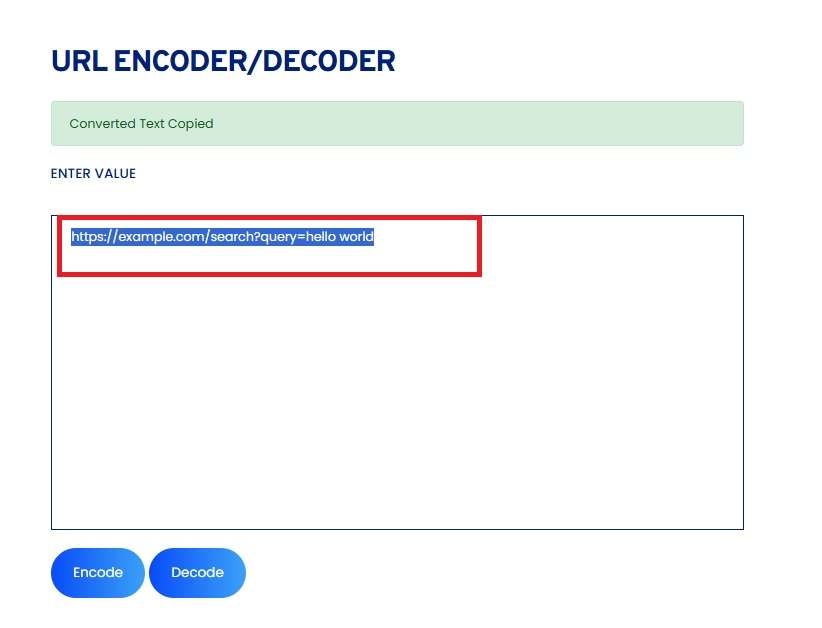
Our URL Encode Decode tool is designed to be user-friendly and efficient. Here is a step-by-step guide on how to use it:
- Go to our website and open the URL Encode Decode tool using the search bar.
- Enter the URL you want to encode or decode into the provided text box.
- Click the button "Encode" or "Decode", depending on your needs.
- The result will be displayed on the screen.
- You can copy the encoded or decoded URL as needed.
Benefits of URL Encoder/Decoder
A URL Encoder/Decoder is a valuable tool for anyone working with web content, coding, or digital marketing. Its main benefit is ensuring safe and accurate data transmission over the internet.
URL encoding converts special characters (like spaces, &, %, etc.) into a format that can be safely used in URLs, preventing errors and broken links. This is especially important when sending data via query strings or form submissions.
On the other hand, decoding helps you read and understand encoded URLs, making it easier to troubleshoot or manage website parameters. It's also beneficial for SEO optimization, ensuring URLs are clean and readable for both users and search engines.
Developers use it to test APIs, manage redirects, and create dynamic links without data loss. Overall, a URL Encoder/Decoder improves website reliability, enhances user experience, and supports seamless web communication.
URL Encoder and URL Decoder
As we discussed earlier, a URL encoder is a tool that converts characters into a format that can be safely included in URLs.
This involves replacing unsafe ASCII characters with a '%' followed by two hexadecimal digits.
Example:
- Input:
https://example.com/search?query=hello world - Encoded:
https://example.com/search?query=hello%20world
While you're optimizing your workflow, you might also find our Amortization Calculator helpful for managing loan payments.
Encoding/Decoding a Piece of Text
Encoding and decoding text is the process of converting information into a different format for secure or efficient communication. Encoding changes readable text into a different format using a specific method, such as Base64 or URL encoding, so it can be safely transmitted or stored..
Decoding is the reverse process, where the encoded text is converted back into its original, readable form. This is commonly used in web development, data transfer, and encryption.
For example, when sending data through a URL, special characters are encoded to prevent errors. Once received, the text is decoded to read the original message.
Using online tools or programming functions, encoding and decoding is fast and easy. It's essential for keeping data intact and readable across different systems. Whether you're a developer or just working with text data, understanding this process is key for smooth and secure communication.
Key Features of URL Encoding or Decoding
URL Encoding or Decoding is a crucial process in web development that ensures data can be safely transmitted through URLs.
One of its key features is converting special characters, like spaces or symbols, into a readable format for web browsers and servers.
For instance, spaces are encoded as "%20", preventing errors during URL transmission. URL encoding ensures compatibility with web standards, as certain characters might be reserved for specific uses in URLs.
Decoding, on the other hand, reverses this process, converting encoded characters back to their original form, making it useful for retrieving user input or data from URLs.
Another important feature is the ability to handle different types of data, such as query strings or form inputs, ensuring they are properly formatted.
URL Encoding and Decoding are essential for seamless and secure communication between web browsers, servers, and APIs, improving user experience and data integrity.
What is a URL Decoder?
A URL decoder is a tool that converts encoded URLs back to their original format.
This involves replacing percent-encoded characters with their corresponding characters as shown in the below examples.
Example:
- Input:
https://example.com/search?query=hello%20world - Decoded:
https://example.com/search?query=hello world
URL Decode in JavaScript with Examples
In JavaScript, URL decoding can be done using the decodeURIComponent() and decodeURI() functions.
Example 1: Using decodeURIComponent()
let encodedURL = 'https%3A%2F%2Fexample.com%2Fsearch%3Fquery%3Dhello%20world';
let decodedURL = decodeURIComponent(encodedURL); console.log(decodedURL);
Output: https://example.com/search?query=hello world
Example 2: Using decodeURI()
let encodedURI = 'https%3A%2F%2Fexample.com%2Fsearch%3Fquery%3Dhello%20world';
let decodedURI = decodeURI(encodedURI); console.log(decodedURI); // Output: https://example.com/search?query=hello%20world
URL Encode in JavaScript with Examples
In JavaScript, URL encoding can be done using the encodeURIComponent() and encodeURI() functions.
Example 1: Using encodeURIComponent()
let url = 'https://example.com/search?query=hello world'; let encodedURL = encodeURIComponent(url); console.log(encodedURL); // Output: https%3A%2F%2Fexample.com%2Fsearch%3Fquery%3Dhello%20world
Example 2: Using encodeURI()
let uri = 'https://example.com/search?query=hello world'; let encodedURI = encodeURI(uri); console.log(encodedURI); // Output: https://example.com/search?query=hello%20world
URL Encode & Decode in Python
In Python, URL encoding and decoding can be performed using the urllib.parse module.
URL Encoding in Python
import urllib.parse url = 'https://example.com/search?query=hello world' encoded_url = urllib.parse.quote(url) print(encoded_url) # Output: https%3A//example.com/search%3Fquery%3Dhello%20world
URL Decoding in Python
import urllib.parse encoded_url = 'https%3A//example.com/search%3Fquery%3Dhello%20world' decoded_url = urllib.parse.unquote(encoded_url) print(decoded_url) # Output: https://example.com/search?query=hello world For those interested in financial planning, explore our FD Calculator to estimate the maturity amount of your fixed deposits.
Applications of URL Encoding and Decoding
A few of the applications for using an URL encoder/ decoder as as follows:
- Web Development: URL encoding and decoding are essential in web development for constructing valid URLs that can be safely transmitted over the internet.
- Data Transmission: Ensuring that special characters in data are encoded correctly before being sent over the web prevents data corruption and ensures integrity.
- API Integration: APIs often require parameters to be URL-encoded to handle special characters correctly, ensuring seamless communication between systems.
- Security: Encoding URLs helps protect against injection attacks by ensuring that special characters are properly escaped.
- Form Submission: Form data is often URL-encoded when submitted via GET requests, ensuring that all characters are correctly transmitted.
What Are URL Encoded Requests?
URL encoding, also known as percent encoding, is a process used to convert data into a valid URL format. This is essential when sending data through a URL, such as in query strings or HTTP requests.
URL encoding replaces unsafe characters (like spaces, special symbols, or non-ASCII characters) with a specific encoding format each unsafe character is represented by a percent sign (%) followed by its ASCII code in hexadecimal form.
For example, a space in a URL is encoded as %20, and a slash / as %2F. This ensures that the URL remains correctly formatted and interpretable by browsers and servers.
URL-encoded requests are commonly used in HTTP GET requests or API requests where data needs to be passed in the URL.
It’s important for maintaining the integrity of the data, especially when it contains special characters or spaces.
Advantages of URL Encoding or Decoding
URL Encoding or Decoding offers several advantages, especially in ensuring smooth communication between web browsers, servers, and APIs.
One key benefit is that URL encoding allows special characters, like spaces, slashes, and punctuation marks, to be converted into a format that is safe for URLs.
This prevents errors during transmission and ensures data integrity. URL decoding reverses the encoding process, making data accessible in its original form, which is useful for retrieving and processing user inputs from web forms or query strings.
Additionally, URL encoding ensures that data is compliant with web standards, enhancing compatibility across different browsers and platforms.
This is essential for securing data in URLs, especially when dealing with sensitive information.
Overall, URL Encoding and Decoding optimize the transfer of data, improve security, and ensure seamless interactions between users and websites, making them vital tools for web development.
Frequently Asked Questions
Q1. What characters need to be URL-encoded?
Ans: Characters that are not alphanumeric or that have special meanings in URLs (e.g., space, #, &, %, /) need to be URL-encoded.
Q2. Is URL encoding case-sensitive?
Ans: No, URL encoding is not case-sensitive. For example, %3A and %3a represent the same character.
Q3. What happens if I don’t encode a URL?
Ans: Not encoding a URL can lead to issues such as incorrect interpretation of the URL by browsers and servers, potentially leading to errors or security vulnerabilities.
Q4. Can URL encoding be reversed?
Ans: Yes, URL encoding can be reversed using URL decoding to retrieve the original URL.
Q5. Is it necessary to encode all URLs?
Ans: Not all URLs require encoding, but it is essential to encode URLs containing special characters or spaces to ensure proper transmission.
Q6. Can URL encoding affect SEO?
Ans: Yes, proper URL encoding can improve SEO by ensuring that URLs are correctly interpreted by search engines and that special characters do not cause indexing issues.
Q7. Does URL encoding affect performance?
Ans: While URL encoding can slightly increase the length of URLs, the performance impact is generally negligible.
Q8. Are there any characters that should not be URL-encoded?
Ans: Alphanumeric characters (A-Z, a-z, 0-9) and a few special characters (-, _, ., ~) do not need to be URL-encoded.
Q9. How do browsers handle URL encoding?
Ans: Browsers automatically encode URLs when necessary, such as when submitting form data or navigating to a URL with special characters.
Q10. Can I use URL encoding in email addresses?
Ans: No, email addresses have their format and do not use URL encoding.
Q11. What tools are available for URL encoding and decoding?
Ans: Various online tools like toolerz.com and browser functions (like encodeURIComponent and decodeURIComponent in JavaScript) are available for URL encoding and decoding.
Q12. Is Toolerz URL encoding secure?
Ans: URL encoding is not a security measure but helps prevent issues with special characters. For security, other measures like encryption should be used.
Q13. Can this URL encoding handle Unicode characters?
Ans: Yes, our URL encoding can handle Unicode characters by representing them as a series of percent-encoded bytes.
Q14. How does URL encoding handle spaces?
Ans: Spaces are encoded as %20 in URL encoding.
Q15. Can URL encoding be used in HTTP headers?
Ans: Yes, URL encoding is often used in HTTP headers to ensure that special characters are correctly transmitted and interpreted.
Q16. What are some common uses for URL encoding and decoding?
Ans: This tool is useful when:
Sharing links that include special characters
Debugging web applications
Ensuring that web forms send the correct information
Integrating with APIs that require encoded URLs
Q17.How do I use a URL encode/decode tool?
Ans: Just copy and paste your text or URL into the tool. Click on "Encode" to convert it into a safe URL format, or "Decode" to turn it back into readable text..
Q18. Does URL encoding change the meaning of my data?
Ans:No, it doesn’t change the meaning. It only changes how the text is formatted so it can be safely used in a URL.
Q19. Can I encode an entire URL?
Ans:Yes, you can encode the full URL or just parts of it like query strings. Be careful not to encode the entire structure (like https://) unless it's required.
Q20. Why do I need to encode a URL?
Ans:URLs can only contain certain characters. If your URL includes spaces, symbols, or non-English letters, encoding them makes sure the web browser or server can read them correctly.
Q21. What is a URL Encoder & Decoder?
Ans:A URL Encoder & Decoder is a tool that changes special characters in a web address into a format that browsers can understand (encoding) and changes it back to the original form (decoding).