WORD REPLACER ONLINE
What is Toolerz Word Replacer?
Toolerz Word Replacer is a digital tool designed to replace specific words in a text with alternative words.
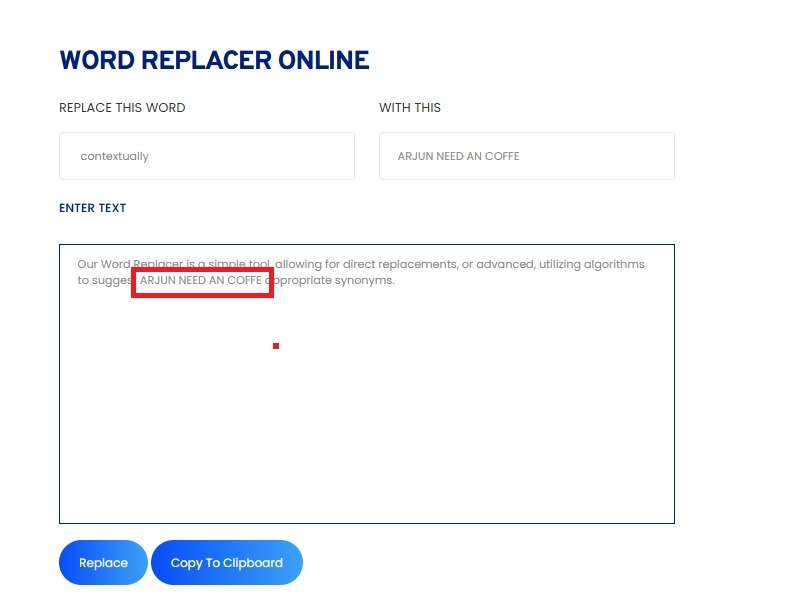
Our Word Replacer is a simple tool, allowing for direct replacements, or advanced, utilizing algorithms to suggest contextually appropriate synonyms.
How to Use Our Word Replacer?
Our word replacer is a simple tool that can be accessible to every user without registration. Here is the simple procedure to use our free online word replacer tool.
1. Visit our Word Replacer page here
2. Paste the text in the text box and enter the specific word that you want to replace with.
3. Hit the Replace button to get the output
4. The converted text will be copied to the clipboard automatically
5. Use the text for your needs
Benefits of Our Word Replacer
User-Friendly Tool: Our Word Replacer is user-friendly and easily understandable to beginners regardless of their technical skill
Advanced Programming: Utilizing state-of-the-art algorithms, our tool provides relatedly appropriate replacements, enhancing the overall quality of the text.
Customization Options: Users can customize the replacements, selecting preferred synonyms or phrases based on context and personal preference.
High Accuracy: The tool ensures precise word replacements, minimizing the risk of altering the original meaning of the text.
Real-Time Processing: Our Word Replacer processes text in real time, providing instant results and improving efficiency.
Multi-Language Support: Our tool supports multiple languages, making it versatile and accessible to a global audience.
SEO Optimization: The tool offers SEO-friendly replacements, helping improve the visibility and ranking of your content on search engines.
Formula for Word Replacement
There is no mathematical formula for the word replacement tool, the process involves a systematic approach to ensure accuracy and context relevance:
Here is the step-by-step process for replacing the words in the given text.
Identify Target Words: The first step is to identify the words or phrases that need to be replaced.
Context Analysis: Analyze the context in which the target word is used to find a suitable replacement.
Synonym Selection: Choose appropriate synonyms or phrases that fit the context and maintain the original meaning.
Replacement: Replace the target word with the chosen synonym or phrase.
Review: Review the modified text to ensure coherence and readability.
Example:
Example 1: Basic Word Replacement
Original Text: "The quick brown fox jumps over the lazy dog."
Target Word: "quick"
Replacement: "swift"
Modified Text after using our Tool: "The swift brown fox jumps over the lazy dog."
Example 2: Contextual Word Replacement
Original Text: "She had a bright idea that could modify the industry."
Target Word: "bright"
Replacement: "innovative"
Modified Text: "She had an innovative idea that could revolutionize the industry."
Need help with financial planning? Try our House Loan Calculator to estimate your loan EMI and repayment schedule.
Use Cases for Text Replacer Online Tool
A Text Replacer online tool is perfect for quickly finding and replacing specific words, phrases, or characters in large blocks of text. It’s a time-saving solution for students, writers, developers, and content editors who often deal with repetitive text tasks.
For example, writers can use it to update keywords across documents, while developers can replace variables or code snippets in seconds. Teachers or students editing bulk assignments, and marketers updating templates or product descriptions, can all benefit from this handy tool.
Whether you're cleaning up text, fixing formatting, or making bulk edits, the Text Replacer tool makes it easy. Just paste your content, enter what you want to replace, and get the updated text instantly.
Key Features of Word Replacer
A Word Replacer is a handy tool designed to automatically find and replace specific words or phrases within a text. One of its key features is bulk replacement, which allows users to change multiple words at once, saving time and effort.
It also supports case sensitivity options, letting users choose whether to match exact cases or not. Many word replacers offer real-time preview, so you can instantly see the changes before applying them.
Another useful feature is custom rule creation, where users can define their own word replacement pairs for repeated use. Advanced tools may also support regular expressions for more complex text editing tasks.
Ideal for writers, coders, content editors, and SEO professionals, a Word Replacer improves efficiency and ensures consistency in documents.
It’s easy to use, available online, and compatible with most devices—making it a valuable tool for both personal and professional use.
Can You Find and Replace in Word Online?
Yes, you can easily use the Find and Replace feature in Word Online. This tool allows users to quickly search for specific words or phrases in a document and replace them with new text. It's especially useful when editing long documents or correcting repeated errors.
To use it, simply press Ctrl + F (or Cmd + F on Mac) to open the Find pane. Then click on the three dots or “Replace” option to open the Replace function. Enter the word you want to find and the word you want to replace it with, then choose “Replace” or “Replace All” as needed.
This feature saves time, improves accuracy, and makes editing documents in Word Online more efficient. Whether you're working on essays, reports, or business documents, Find and Replace helps you maintain consistency and clarity in your writing.
Applications of Word Replacer
1. Content Creation
Word Replacers are essential for content creators who need to produce high-quality, engaging text.
Whether you are writing articles, blog posts, or social media content, this tool helps you avoid repetition and enhance readability.
2. Editing and Proofreading
News Editors and proofreaders use Word Replacers to improve the clarity and coherence of text.
By replacing vague or redundant words with more precise alternatives, they ensure the text is polished and professional.
3. SEO Optimization
Marketers and SEO specialists use Word Replacers to optimize content for search engines. By replacing non-keywords with targeted keywords, they can improve the visibility and ranking of their content.
4. Academic Writing
Students and researchers use Word Replacers to enhance their academic papers. This tool helps them avoid plagiarism by providing alternative phrasing and improves the overall quality of their writing.
5. Translation and Localization
Translators use Word Replacers to find contextually appropriate synonyms in different languages, ensuring the translated text maintains the original meaning and tone.
For better text management, you can also try our Word Counter to keep track of your word and character count.
Advantages of Word Replacer Online
A Word Replacer Online tool offers a fast and efficient way to edit text by automatically replacing specific words or phrases. One major advantage is that it saves time, especially when dealing with large documents or repetitive content.
Instead of manually searching and changing each word, users can update multiple instances in just a few clicks. It's perfect for students, writers, editors, and content creators who want to improve or rephrase text quickly.
The tool also reduces the chance of missing errors, ensuring consistency across the content. Many tools support case sensitivity and whole word matching for more accurate replacements.
Whether you’re updating keywords, correcting typos, or customizing templates, a Word Replacer Online simplifies the process.
It’s easy to use, accessible from any device, and requires no software installation—making it a convenient and reliable choice for quick text editing tasks.
Conclusion of Word Replacer Online
The Word Replacer Online tool is a smart and efficient solution for quick text editing. Whether you're updating keywords, correcting repeated mistakes, or modifying large blocks of content, this tool helps you do it with speed and accuracy.
Its ability to replace multiple words at once not only saves time but also ensures consistency across your document. With a simple interface and instant results, it’s suitable for everyone—from students and teachers to bloggers and professionals.
There's no need for complex software or technical skills, making it a convenient choice for on-the-go editing.
In short, the Word Replacer Online tool enhances productivity, reduces manual effort, and simplifies the task of editing repetitive text—making it a valuable asset for everyday writing and content management needs.
FAQs
Q1: Is the Toolerz Word Replacer free to use?
Ans: Yes, our Word Replacer is completely free to use for business purposes also.www.toolerz.com
Q2: How accurate is the Toolerz Word Replacer?
Ans: Our Word Replacer uses advanced algorithms to ensure high accuracy in word replacements, maintaining the original meaning and context of the text.
Q3: Can the Word Replacer handle large documents?
Ans: Yes, our Word Replacer can process large documents efficiently, providing quick and accurate word replacements.
Q4: Is the Word Replacer mobile-friendly?
Ans: Yes, our Word Replacer is fully optimized for mobile devices, allowing you to perform word replacements on the go.
Q5: Can I use the Word Replacer for SEO purposes?
Ans: Absolutely. Our Word Replacer offers SEO-friendly replacements, helping you optimize your content for search engines.
Q6: Does the Word Replacer support multiple languages?
Ans: Yes, our Word Replacer supports multiple languages, making it versatile and accessible to a global audience.
Q7: Can I customize the replacements in the Word Replacer?
Ans: Yes, our Word Replacer allows users to customize the replacements, selecting preferred synonyms or phrases based on context and personal preference.
Q8: Is it possible to save my modifications?
Ans: While our Word Replacer does not currently offer a save function, you can easily copy and paste the modified text or take screenshots for future reference.
Q9: How often is the Word Replacer updated?
Ans: We regularly update our Word Replacer to ensure it reflects the latest advancements and provides the most accurate results.
Q10: Can the Word Replacer be used for academic writing?
Ans: Yes, our Word Replacer is an excellent tool for academic writing, helping students and researchers enhance their papers and avoid plagiarism.
Q11: What are some common uses of a Word Replacer tool?
Ans: People use word replacers for various purposes, such as:
Rewriting content to improve clarity
Avoiding repetitive words in essays or articles
Creating unique versions of text for SEO
Finding better synonyms for creative writing
Editing documents faster
Q12: Can I use a Word Replacer tool on mobile devices?
Ans:Yes, many word replacer tools are accessible via web browsers on smartphones and tablets. Some also have dedicated mobile apps for easier use.
Q13: What kind of texts can I use with a word replacer?
Ans: You can use it with all types of text essays, articles, blog posts, emails, or even code. It’s a helpful tool for students, writers, bloggers, and anyone who edits content.
Q14: Is my text safe when I use a word replacer online?
Ans:Most word replacer tools don’t save or store your data. But to be extra safe, avoid entering sensitive or personal information.
Q15: Will it replace words with the same meaning automatically?
Ans:No, the tool only replaces exact words or phrases you enter. It won’t understand context or suggest synonyms unless it has that feature.
Q16: Why should I use a Word Replacer tool?
Ans:Using a word replacer saves time, especially when you need to change the same word many times in a large document. It also helps avoid typing mistakes and makes editing more accurate.
Q17: What is a Word Replacer Online Tool?
Ans:A Word Replacer Online tool is a simple tool that helps you replace specific words or phrases in a block of text. You just enter your text, choose the word you want to change, and the word you want to replace it with. The tool will do the rest automatically.